

Since version 7.021, released in April 2017, CyberSEO Pro allows one to define HTML templates for post title, post content, post excerpt, meta title and meta description used by Yoast SEO, Rank Math SEO, SEOPress, The SEO Framework and Slim SEO. You can use these text boxes to define the layout and contents of the posts, generated by CyberSEO Pro.
The following predefined placeholders are available:
%post_title%– post title;%post_date%– post date and time of the post in the DATE_RSS format: “YYYY-MM-DD HH:MM:SS”;%post_date[format]%– post date and time of the specified datetime format, e.g.:%post_date[Y-m-d]%;%post_content%– post content;%post_content[max_words]%– the post content in HTML format, with the maximum specified number of words. The post content is shortened to the specified number of words;%post_content_notags%– post content with stripped HTML tags;%post_content_notags[max_words]%– the post content with stripped HTML tags. The post content is shortened to the specified number of words;%post_excerpt%– post excerpt;%post_excerpt[max_words]%– the post excerpt in HTML format, with the maximum specified number of words. The post excerpt is shortened to the specified number of words;%post_excerpt_notags%– post excerpt with stripped HTML tags;%post_excerpt_notags[max_words]%– the excerpt content with stripped HTML tags. The post excerpt is shortened to the specified number of words;%post_tags%– post tags as a coma-delimited text string;%categories%– post categories as a coma-delimited text string;%link%– a link to source;%post_guid%– post GUID;%gpt_prompt[prompt]%– will be replaced with the result of the prompt processed by the AI model set in Default AI model, allowing this result to be used inside other placeholders with multiple nesting or within shortcodes (without nesting). See the examples below;%gpt_keywords%– will be replaced with a coma-delimited list of keywords found in the article by analyzing it with the default AI model;%gpt_keywords_en%– will be replaced with a coma-delimited list of English keywords found in the article by analyzing it with the default AI model;%gpt_keyphrase%– will be replaced with a short keyphrase defined for the article by analyzing it with the default AI model;%gpt_keyphrase_en%– will be replaced with a short English keyphrase defined for the article by analyzing it with the default AI model;%gpt_image_prompt%– analyzes the text of the current article with default AI model and generates a prompt to create a relevant image using supported graphic models like Midjourney, DALL-E 3, and Stable Diffusion. When used in conjunction with the “Batch insert” mode on the Media enhancement tab, the%gpt_image_prompt%placeholder generates a unique prompt for each section of text before which an image is inserted. This is a very powerful tool to graphically illustrate text imported from third party sources or generated from scratch using AI.%media_description%– post media description, if media attachments are included;%enclosure_url%– the enclosure URL, if attachment enclosure is included;%xml_tags[name]%– an XML tag value, wherenamemust be replaced with the actual XML tag name;%xml_tags_attr[name][attr]%– a XML tag attribute, wherenamemust be replaced by the actual XML tag name andattrmust be replaced by its attribute name;%params[name]%– a value of the specified feed URL parameter. E.g. if the feed URL is http://www.ebay.com/sch/i.html?_nkw=books&_rss=1, the %params[_nkw]% will be replaced with “books”.%custom_fields[name]%– a custom field value, wherenamemust be replaced with the actual custom field name;%media_content[n]%– a link to the media content (<media:content>), wherenis its integer index, if media enclosures are included;%media_thumbnail[n]%– a link to the media thumbnail (<media:thumbnail>), wherenis its integer index, if media enclosures are included;%random_image[keywords]%– a random image URL for one of givenkeywordsfrom the Google Images search results with the “Creative Commons licenses” filter applied.%random_file[path]%– returns the URL of a random file located on the server at the given absolute path. For example, this function can be used to insert a random image from a specified directory on the server into a post. E.g:<img src="%random_file[path]%">, where “path” is an absolute path to a directory on the server where the images are located. Read this article for more information.%pixabay[keywords]%– a random full-size image URL for one of givenkeywordsfrom the Pixabay image stock search results. You can also use commas to separate your list of keywords. In this case, a random keyword will be chosen.%youtube_video[keyword]%– a YouTube video embed code for a givenkeyword.%youtube_transcript[YouTube video URL or ID]%– imports the transcript for a given link to a YouTube video. For example, the following will be replaced with the transcript for the YouTube video currently being imported%youtube_transcript[%link%]%. The shortcode should be used as the content to be transformed by the AI.
Updated on June 26, 2026.
E.g. if you want to add some text to every post title (say “Breaking news:”), you should alter the “Post title” template like this:
Breaking news: %post_title%
Here is another example. Let’s say you are going to import a product XML feed which has the following items:
<product_name>the product name here</product_name>
<picture>the product picture URL here</picture>
<price>the product price here</price>
First of all, you have to set the necessary custom fields:

Now define your “Post template” like this:
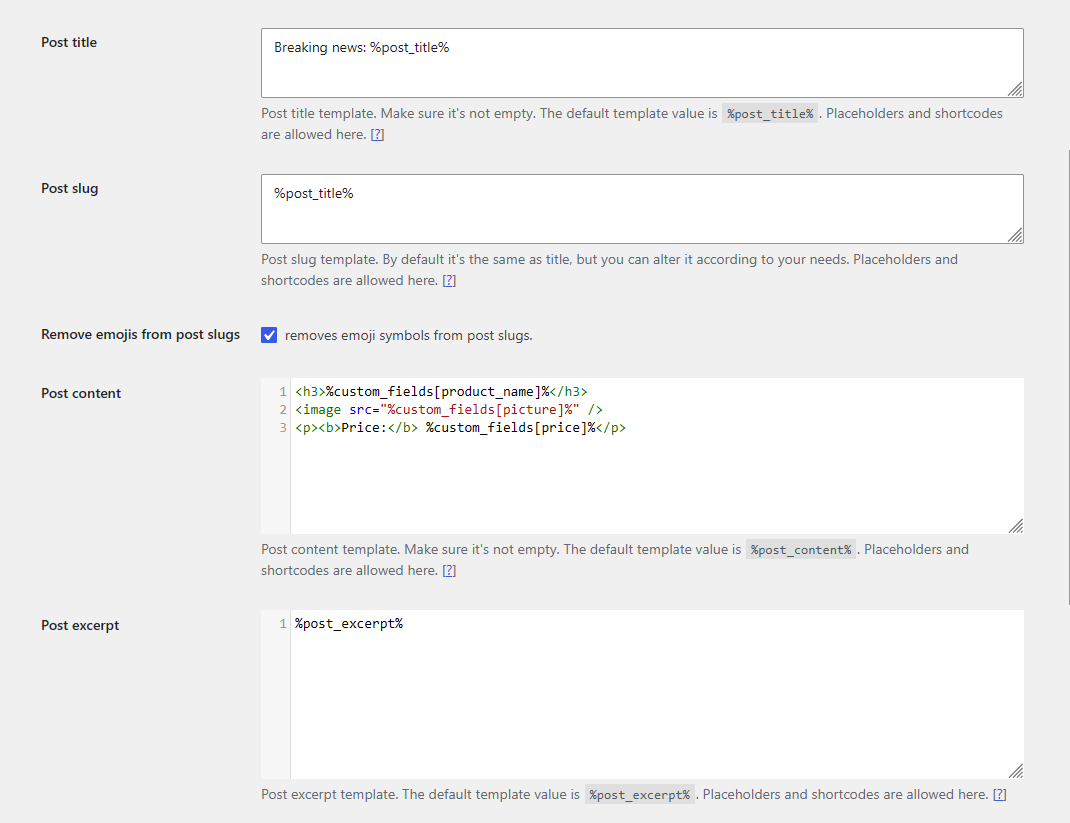
That’s all you have to do to import almost anything as posts, pages or any custom data type into WordPress and PHP knowledge is not needed anymore!