

 Log In
 Home
Home


 (0 votes)
 11:34 am

November 12, 2023
 Offline


Hey,
Is it possible to somehow get the plugin to also include commenting on pages or custom post types?
Thanks!
11:40 am

July 2, 2009
Offline
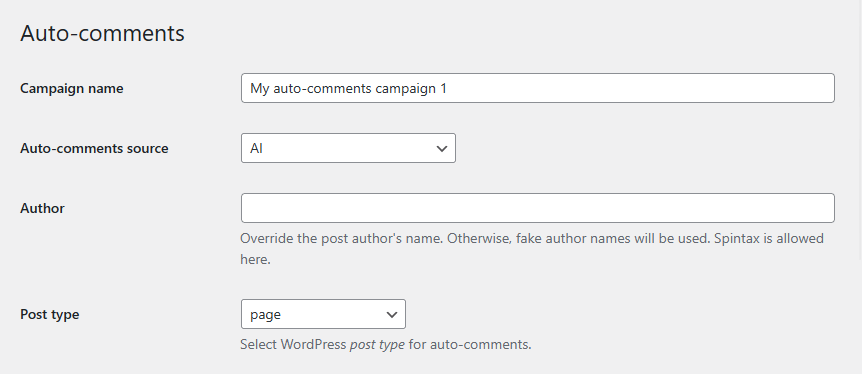
Yes. To do this, simply select the desired Post type (e.g. "page") on the settings page of your auto-comments campaign:
11:48 am
November 12, 2023
Offline
I don't see this option on my end. Do I need to do something to enable it?
Here's a screenshot:
 Login to see this link
12:21 pm
July 2, 2009
Offline
This feature was added in version 12.046, which was released on October 30, 2025: https://www.cyberseo.net/changelog/
You can use this form to upgrade your plugin to the current version and receive new versions throughout the year: https://www.cyberseo.net/upgrade/#renew
1:29 pm
November 12, 2023
Offline
I just renewed using the link you provided, but still no email with the download link has arrived.
Can you check please?
Thanks!
1:33 pm
July 2, 2009
Offline
The link is needed to download the plugin. Since you already have it, you don't need to download the same file again. Just go to the General Settings page and click the core update button, or wait 24 hours and the plugin version will update automatically.
 All RSS
Most Users Ever Online: 1026
Currently Online:
30 Guest(s)
Currently Browsing this Page:
1 Guest(s)
Top Posters:
ninja321: 87
harboot: 75
s.baryshev.aoasp: 68
Freedom: 61
Pandermos: 54
tormodg: 53
Member Stats:
Guest Posters: 338
Members: 3322
Moderators: 0
Admins: 1
Forum Stats:
Groups: 1
Forums: 5
Topics: 1760
Posts: 9080
Newest Members:
ntzaferis, mario.claroarcos, welf.kienle.kienle, lapageparfaite27, vardis11, miranewsruAdministrators: CyberSEO: 4276