

In the past, WordPress autoblogging only involved importing posts from RSS and Atom feeds. Later, plugins learned to extract full articles directly from web pages. Then came synonymizers and rewriters, and finally, AI.
Now, CyberSEO Pro, RSS Retriever, and AI Autoblogger offer much more than simple post imports. Modern content import plugins like CyberSEO Pro and RSS Retriever can retrieve material from a variety of public sources. They can extract and process full-text articles, translate and rewrite posts, and supplement them with AI-generated images. AI Autoblogger, on the other hand, doesn’t require an external content source: it uses large language models (LLMs) to generate articles and AI models to create illustrations.
In short, which plugin should you choose?
For classic RSS/Atom autoblogging with AI processing, choose RSS Retriever. If your content can come from various sources, such as RSS, JSON, XML, CSV, XLS, and HTML, CyberSEO Pro is the clear choice. If you don’t need external sources and want to generate articles in bulk from a list of topics or headlines, AI Autoblogger is the best option.
All three products overlap in their AI capabilities, but they are designed around different workflows. The sections below explain where those differences actually matter.
The table below compares the core features of the three plugins discussed in this review: CyberSEO Pro, RSS Retriever, and AI Autoblogger. Note that RSS Retriever has a free version – RSS Retriever Lite, which is only suitable for importing content from RSS and Atom feeds and lacks AI functionality. Therefore, it is not included in the table.
| Features | CyberSEO Pro | RSS Retriever | AI Autoblogger |
|---|---|---|---|
| Import RSS/Atom into posts | Yes | Yes | Not a syndication tool |
| Import arbitrary XML/JSON sources | Yes | Not documented as a separate universal import script | Does not import feeds |
| CSV/XLS and arbitrary text as a source | Yes | No equivalent universal importer is documented | Headline list with a separator and optional per-article fields |
| Long-form generation by a dedicated AI writing agent | Yes | Yes (same engine) | Yes, via campaign settings |
| Detailed instructions for individual sections | Yes | Yes | Yes |
| Images linked to the content of specific text fragments | Yes, but through post-processing of the finished text – you need to specify section separator tags | Likewise, through post-processing of the finished text | Yes, section by section at the time of generation – immediately after each part is written |
| Built-in table of contents (TOC) and native WordPress page-by-page pagination | Not documented as a built-in feature | Not documented as a built-in feature | Yes |
| WPML/Polylang | Yes | Yes | Yes |
| Integration with SEO plugins (meta title/description) | Yes | Yes | Yes |
| Custom post types | Yes | Yes | Yes |
| Save as draft / submit for moderation | Yes | Yes | Yes |
| Custom PHP code for imported posts | Yes | No | No (not applicable – no import) |
“Not documented” does not mean “impossible in principle via third-party code or another plugin.” It simply means there is no built-in control dedicated to this feature, so you should not rely on it.
CyberSEO Pro – the Swiss Army knife of autoblogging
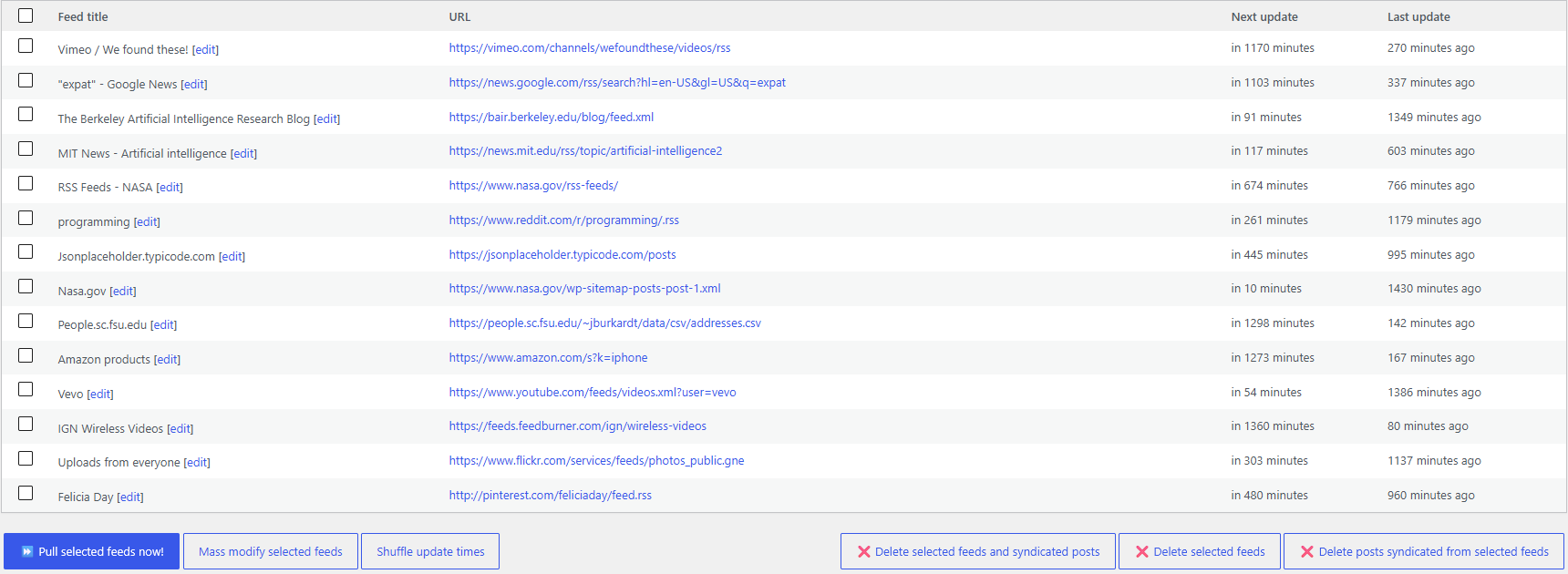
CyberSEO Pro is the most versatile of the three plugins. This tool can import content from virtually anywhere, including XML sitemaps and WordPress post archives. If the source is inaccessible, it will retrieve the most recent snapshot from the Wayback Machine. This applies not only to the feed itself, but also to individual articles and even the images within them, if the original can no longer be accessed directly for some reason.
Supported sources: RSS, Atom, XML, JSON, CSV, XLS, plain text, HTML pages, XML sitemaps, and a number of social networks and media platforms are supported. All of these are converted to a unified internal structure, enabling templates, filters, AI instructions, and publishing rules to be reused regardless of the source format.
This is where it really makes a difference. Consider a site that needs to import updates from a licensed RSS feed, convert a supplier’s CSV catalog into WooCommerce products, process entries from a JSON endpoint, and generate explanatory articles based on an editorial list of topics. A single automation system can handle all of this without switching between “regular import” and “separate AI generation.”
CyberSEO Pro can also generate articles from scratch using the same method as AI Autoblogger, via its own AI writing agent. This feature isn’t presented in a separate, user-friendly campaign interface; it’s controlled via shortcodes (e.g., [gpt_article]) directly within the post template. This requires an understanding of the syntax rather than simply filling out a form.
The PHP customization layer is important when standard settings aren’t sufficient, such as when you need to normalize incoming values or modify a post’s properties before publication. You can use custom code directly within the settings for a specific feed without separate files or integrations.
This breadth of functionality didn’t result from a single release but rather from the plugin’s continuous development since 2006. Over nearly two decades, functionality has been added to support a wide variety of autoblogging strategies – in fact, CyberSEO Pro already has a ready-made tool for virtually any task in this field, even if it sometimes requires more in-depth configuration than specialized plugins.
Choose CyberSEO Pro if you need a single tool for all your autoblogging needs, from importing content from any source format (with a Wayback Machine backup if the source is unavailable) to generating articles from scratch. Be prepared, though, for the fact that some of this flexibility is configured via shortcodes and PHP rather than through a simple interface.
RSS Retriever – the same AI capabilities, focused on RSS and Atom
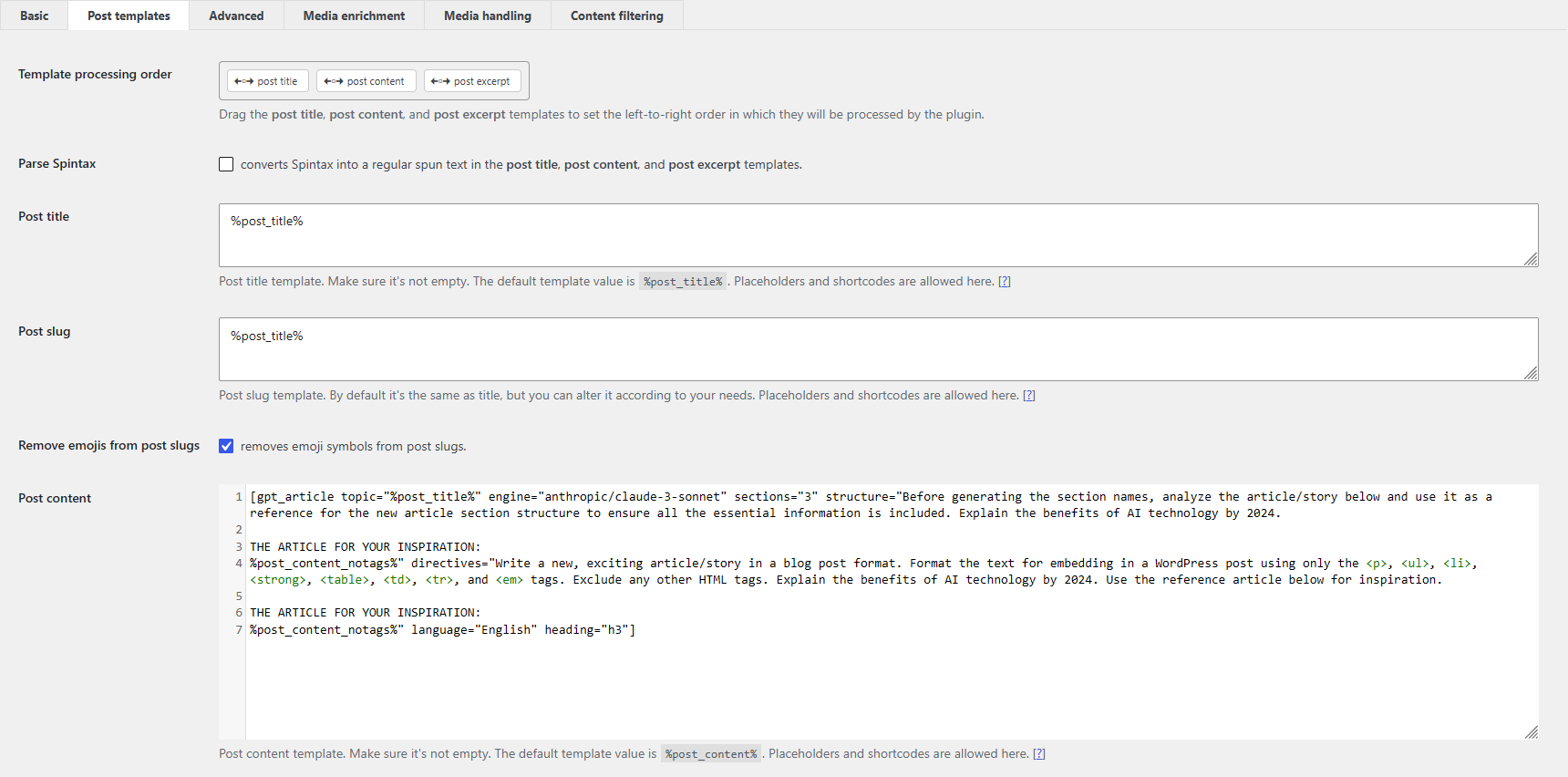
RSS Retriever shares many of CyberSEO Pro’s AI and content-processing capabilities, but it is focused solely on RSS and Atom feeds.
In practice, this means the following: it fetches videos from YouTube channels or playlists in the same way CyberSEO Pro does because YouTube provides them as an RSS feed. However, it cannot retrieve the text transcripts of those videos for subsequent AI processing because transcripts are not included in the RSS feed. Extracting them requires a custom parser, which this plugin lacks. Similarly, it lacks the ability to use custom PHP code to fine-tune imported content, the feature that handles nonstandard tasks in CyberSEO Pro. In exchange, the plugin is lighter and cheaper.
It imports RSS and Atom items into WordPress posts or pages, and it supports media feeds from services such as YouTube, Vimeo, Flickr, and Dailymotion. After importing, you can extract the full text of an item, filter it, translate it, process it using AI, add images, and set its publication status.
For a website that publishes licensed industry news, a campaign can check the publisher’s RSS feed, filter new entries by keywords, retrieve the full text where technically and legally available, process it with AI, add source attribution, and save the result for moderation. Checking for duplicates by link and/or title prevents re-import – but does not constitute a plagiarism check or an assessment of editorial originality.
RSS Retriever shares CyberSEO Pro’s advanced AI processing capabilities, including HTML templates, placeholders, AI shortcodes, the proprietary long-form writing agent, custom fields, post types and taxonomies, WPML/Polylang integration, SEO metadata, media handling, proxies and HTTP headers.
It can generate a new article from an imported title just as easily as process the original content. The key difference is that its normal input is still an RSS or Atom feed rather than an arbitrary file or data source.
AI Autoblogger – generating articles based on topics, not sources
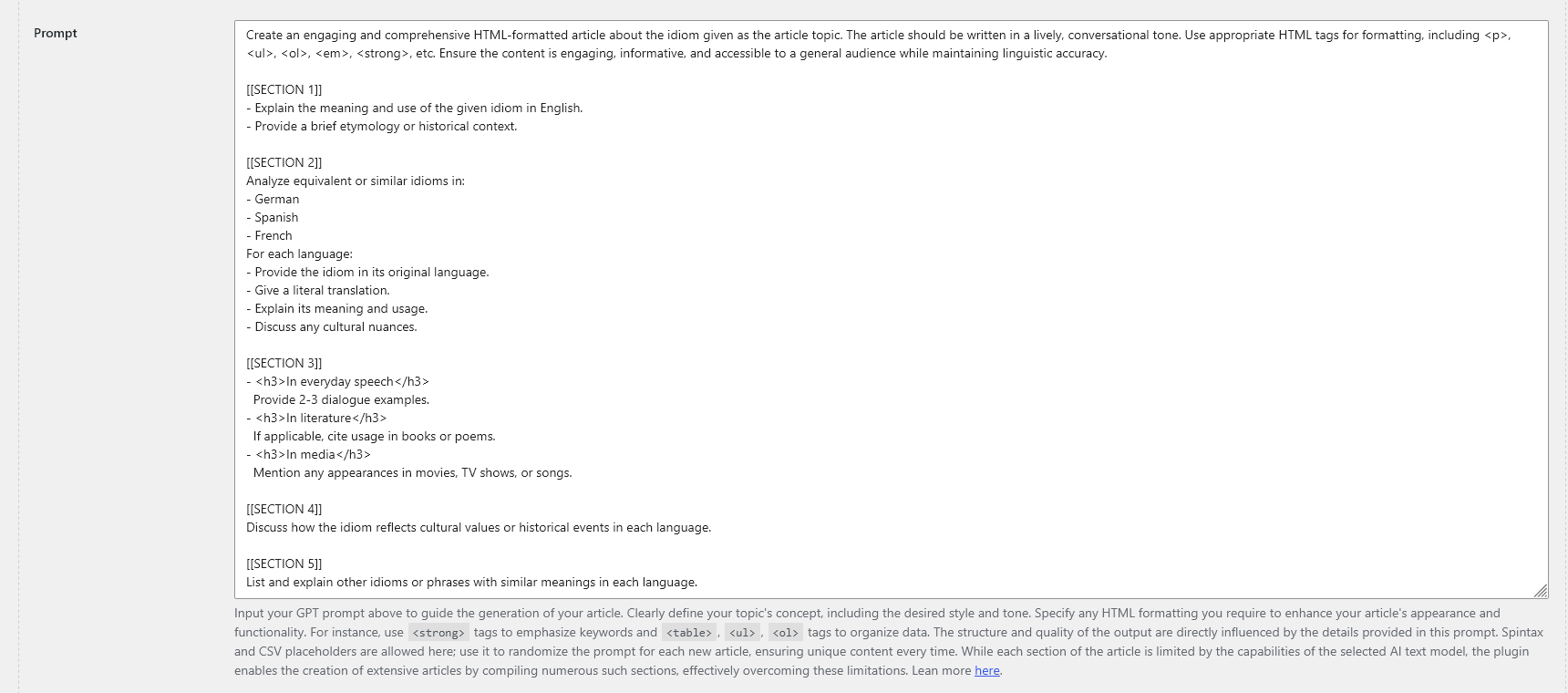
AI Autoblogger doesn’t start with a syndication feed, but with an editorial queue of topics.
The list of headlines can be entered manually or generated automatically from the campaign topic. Additional data – such as keywords or a specific brief for a particular article – can be attached to each line and inserted into the prompt using a placeholder like %%csv_fieldN%%.
For example:
How to maintain a commuter bicycle|bicycle maintenance|Focus on rainy-weather maintenance
This allows a single campaign to handle hundreds or thousands of topics, with each article having its own set of prompts, without having to create a separate campaign for each headline.
Long articles are built using the same multi-stage, section-by-section generation principle as in CyberSEO Pro/RSS Retriever: structure, number of sections, general instructions, and specific instructions for individual sections. AI Autoblogger stands out not because of its text-generation technology, but because of its dedicated interface for long-form content. It provides a linked table of contents, native WordPress pagination, section-specific illustrations, a cover image, SEO metadata, generation intervals, and publication controls.
Additional features include: Live Search mode is available for models via OpenRouter. This mode provides more up-to-date information, but it does not apply to models connected directly via their providers’ APIs. The system also supports WPML/Polylang, allows you to insert relevant YouTube videos, publish to custom post types, etc.
What to Keep in Mind. Here, the shortfall runs the other way: AI Autoblogger is not a syndication tool. If your data comes from RSS, JSON, CSV, or a web page and requires preprocessing, CyberSEO Pro is the best solution. Generating content “from scratch” does not guarantee factual accuracy or publish-ready quality without verification. Even with Live Search, it is essential to double-check important claims and links.
AI Autoblogger makes more sense for managing the mass generation of long articles directly from topics, headlines, and briefs, without the need for complicated configuration. CyberSEO Pro is worth the extra setup if your current topic-based generation workflow is already working and a separate campaign interface won’t offer any tangible benefits.
What CyberSEO Pro, RSS Retriever and AI Autoblogger have in common
Although these three plugins are designed for different workflows, they share much more of their AI functionality than their interfaces might suggest.
Section-by-section generation with context accumulation
All three plugins include a built-in AI writing agent based on prompt pipelines. It can generate articles of any length (even an entire book) by making a series of separate, targeted API requests, each with its own prompt. First, an outline is created. Then, each section is generated separately. The outline of the article, instructions, and previously written text are passed along in the request. This means the model works with accumulated context rather than writing isolated fragments. The only difference between the products is how these instructions are entered: for CyberSEO Pro and RSS Retriever, it’s through post template parameters; for AI Autoblogger, it’s through fields in the campaign interface. This does not eliminate the limitations of the model’s context window and does not guarantee perfect coherence. Long texts should still be proofread in any case.
Images are linked to content
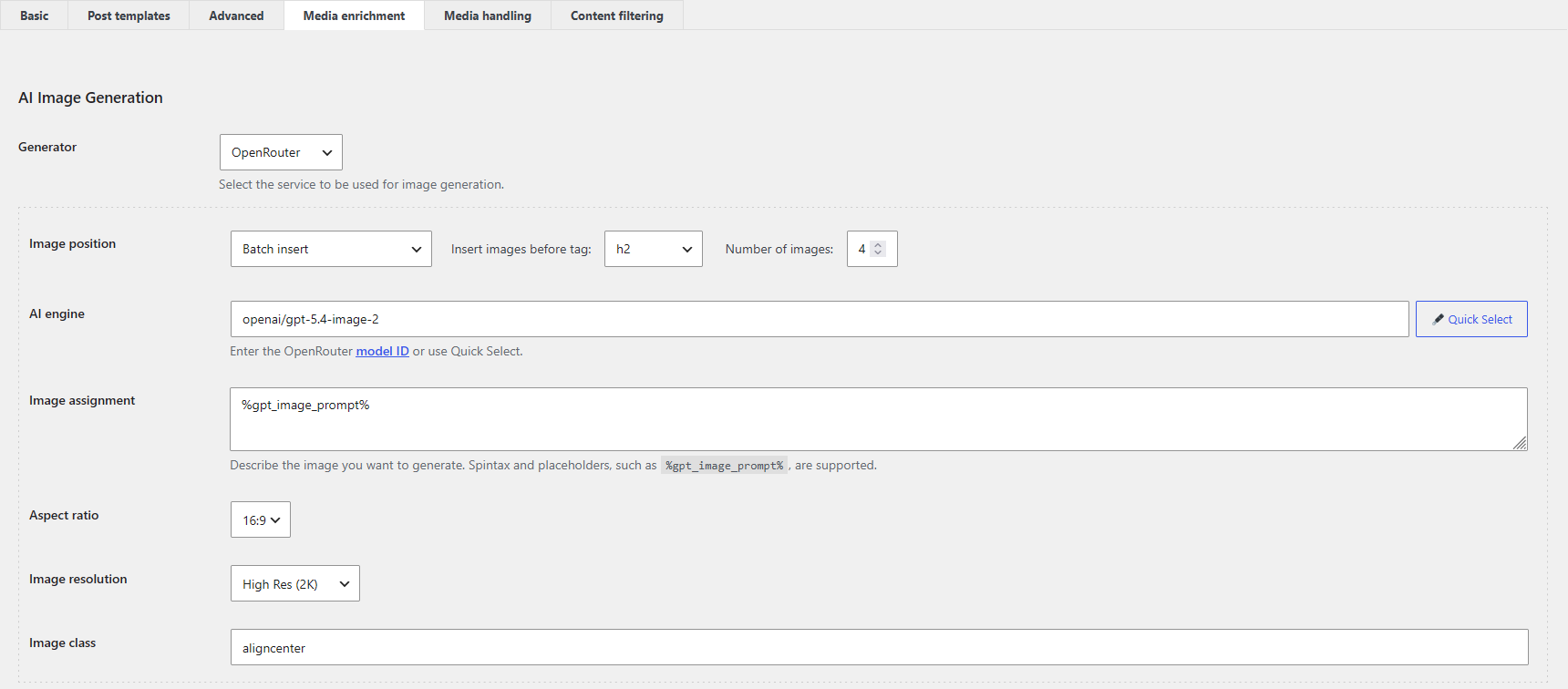
All three can generate an image prompt based on a specific text snippet rather than the general topic of the entire article – but they do so in different ways. CyberSEO Pro and RSS Retriever work with text that’s already fully prepared (whether it’s imported or generated by the same writing agent): to place images, you need to specify HTML tags in the settings that will be used to divide the text into meaningful blocks – after which each block is analyzed and illustrated retroactively.
This is the best solution for pre-written imported text that doesn’t contain a single image in the original. AI Autoblogger solves the same problem differently: it analyzes the text and generates an illustration prompt immediately after each section is written, even before the next one is written – the illustration appears in sync with the writing process, rather than as a separate step after the article is finished. This approach requires less manual configuration for content created from scratch.
Multilingual versions are available via WPML/Polylang
The same principle of differentiation applies here as with images. CyberSEO Pro and RSS Retriever translate the entire article in a single request. For them, just as with image placement, the imported or generated text is a single, complete document that is sent for translation as a whole. AI Autoblogger translates articles differently: each text section is translated via a separate request, just as it was originally written and illustrated – in parts, rather than as a whole after the fact.
The final output is always the same – a finished version of the article in the target language – but the process itself is organized differently, and this stems from the same architectural difference: a single, finished text for some plugins versus a sequential, section-by-section assembly for the other.
Pricing and updates
Autoblogging makes the most sense when scaled up, and all three plugins offer separate multisite licenses. This significantly reduces the price per site as the number of sites increases.
| Plugin | One-site license | 100-site license |
|---|---|---|
| CyberSEO Pro | $34.95 / site | $3 / site |
| RSS Retriever | $24.95 / site | $2 / site |
| AI Autoblogger | $24.95 / site | $2 / site |
For plugins with this set of features, this is an exceptionally low price. It’s practically impossible to find lifetime licenses with comparable functionality for $2–3 per site. The developers understand the actual use case: people don’t buy autoblogging tools for a single post on a single site, but rather for a network of sites. The pricing is structured to accommodate this scenario.
All three products are sold without a mandatory monthly subscription. CyberSEO Pro includes one year of updates with the license. After that, the next year can be purchased at a 50% discount. RSS Retriever and AI Autoblogger list free updates on their purchase pages. Be sure to check the current terms on the official websites before purchasing, as they are subject to change.
The plugin license does not include AI API costs. OpenAI, Claude, Gemini, OpenRouter, and other external services are billed separately. When generating content at scale, these costs typically account for the bulk of the expenses rather than the license fee itself. This is particularly noticeable with long, section-by-section generation. The further into the article you go, the more tokens are used to pass the text already written into each subsequent request. Therefore, the final word count of the finished article alone does not provide an accurate estimate of the cost.
Autoblogging and SEO
The mere presence of AI in a plugin does not determine Google search results. The key question is how you’ve configured the automated generation and what kind of content readers ultimately receive. Google does not prohibit AI-generated content. However, the mass creation of pages with no added value may violate its policy against scaled content abuse, which manipulates search results. It’s worth checking the current wording in Google Search Central’s spam policies, as these pages are updated periodically.
At the same time, the whole point of autoblogging is mass automation. No one buys such a plugin just for a single post on a single website. For this automation to work, rather than turning into a conveyor belt of random, AI-generated pages, you must first find the right settings instead of running the generator at full capacity right away.
Step 1: select AI models separately for text and images. The quality and price of models can vary greatly. You can choose some of the best available solutions – such as the latest models from OpenAI or Anthropic for text, or Midjourney for images – but keep in mind that the API cost will reflect that choice. Alternatively, you can choose significantly cheaper models and get a lower-quality but more cost-effective result. There is no one-size-fits-all solution – everyone must find their own balance between quality and cost. You won’t be able to do so without conducting practical experiments.
Step 2: testing Prompts. The specific output of the selected model largely depends on how the prompt is phrased. It makes sense to systematically test different variations, compare the results, and refine the instructions until the quality is acceptable at a reasonable cost. We’re dedicating a separate series of articles to this topic, covering prompt engineering and fine-tuning AI generation.
Step 3: only then should you consider scaling. Once the models have been selected and the cost is acceptable, and the prompts yield predictable results, you can let the auto-blog network run on its own. The plugin then does its job automatically. It receives source data or topics, runs the necessary AI models, processes the results, generates images, and publishes posts according to a set schedule.
This sequence allows autoblogging to be used as a tool for mass-producing useful content, rather than as a generator of random AI-generated pages.
The verdict
CyberSEO Pro stands out for WordPress automation that combines multiple source formats, AI generation, and custom processing.
RSS Retriever is particularly well suited to anyone with RSS or Atom feeds who needs full-text extraction, AI processing, and publishing control around these feeds.
AI Autoblogger is designed specifically for posts that start with topics and briefs, with dedicated settings for article structure, section-by-section instructions, illustrations, and navigation.
Remember, all three can generate long-form AI content. The real difference is not about their writing skills, but how that fits into your content workflow.