
Recent changes to the xAI API have made it difficult for users of the CyberSEO Pro WordPress autobloggin plugin to automate content creation that depends on actual data from the internet.
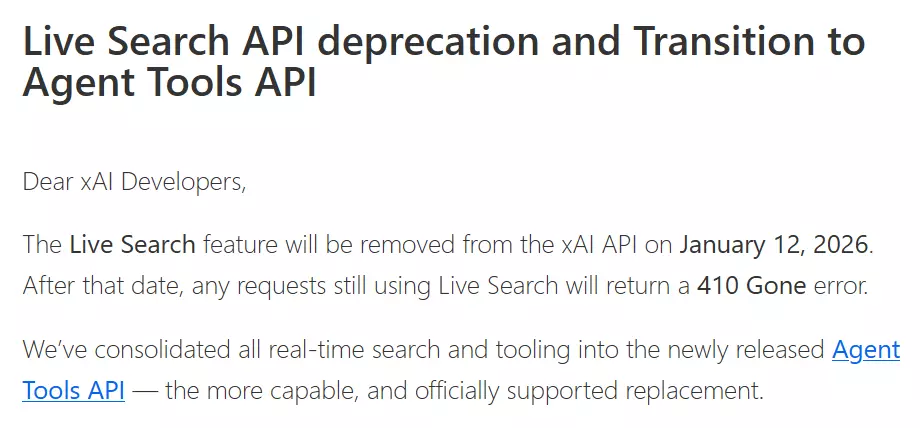
Since January 12, 2026, the Live Search feature has officially been removed from all Grok language models. This means that many familiar post generation strategies, which relied on obtaining real-time data from the web, have suddenly stopped working.
This issue caused serious problems for owners of news sites and product showcases. For example, in the AliExpress affiliate automation with AI reviews and XLS import, we examined how to use AI to generate professional product descriptions from AliExpress.
This approach bypassed the difficulty of parsing protected JavaScript pages by delegating the search for information to AI. However, now that xAI Grok LLM has been blinded, this proven method must be urgently revised.
Fortunately, there is a solution that may be even more productive than the original method. In this article, we will explain how to quickly transfer your autoblog to Perplexity Sonar models, which were created for deep, real-time searches. But that’s not all. In this article, you will learn how to use the OpenRouter service to restore lost functions and access a hidden bonus feature.
Direct connection to Perplexity via Custom AI Endpoints
If you prefer to work with the source directly, the most logical step would be to switch to Perplexity’s official API. Their Sonar family of models is currently the gold standard for what real-time search integrated into a neural network should look like. In CyberSEO Pro, this is implemented through the Custom AI endpoints tab, which allows you to connect virtually any external AI LLM service that is compatible with OpenAI specifications.
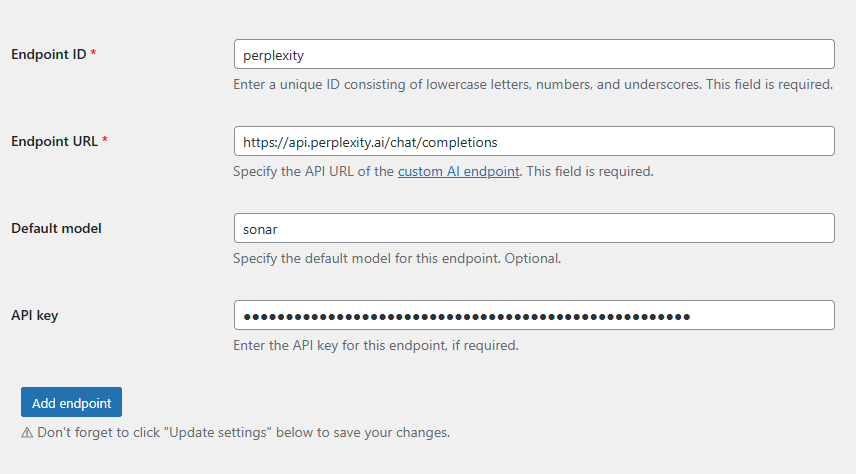
The setup process is simple. First, register the endpoint by assigning it a unique ID. For example, use the ID perplexity. Then, specify the base URL: https://api.perplexity.ai/chat/completions. Finally, enter your API key. Leave the default model field set to sonar. After saving the settings, the plugin automatically combines your ID and the model name with a hyphen to create a ready-to-use identifier.
In practice, this allows you to use the universal shortcode [ai_generate], which will directly access Perplexity’s search capabilities. It looks like this:
[ai_generate engine="perplexity-sonar" prompt="Search for: %xml_tags[product_desc]%. Write a medium-length product review in HTML snippets.

STRICT REQUIREMENTS:
- Use ONLY <p>, <ul>, <li>, <b>, <i> tags.
- NO <h1>-<h6> headers, NO <div>, NO CSS.
- NO citations, NO [n] brackets, NO footnotes, NO links.
- Start DIRECTLY with the analysis.
- No intros, no greetings, no 'Here is...'.
- Tone: Casual, tech-vlog style, light humor.
- Focus on: build quality, real-world experience, pros/cons."]
This combination works quickly and reliably, providing the model with access to the latest data it finds on the network at the moment the post is generated.
The magic of OpenRouter and universal search with the online modifier
However, there is an even more flexible – and perhaps the most exciting – way to restore live web vision to your models: using the OpenRouter service. It provides access to hundreds of different LLMs with a single key and a special “cheat code”. in accordance to the official documentation the :online modifier can be added to the name of almost any model’s name.
Pricing as of February 25, 2026
The :online modifier uses your OpenRouter credits and charges $4 for every 1,000 results, in addition to LLM usage charges. The number of results is set to 5, with a maximum cost of $0.02 per request.
Imagine you’re accustomed to the style of GPT-4o-mini or another specific model but lack its ability to process current events. By adding a suffix to the model ID, you can activate the search engine. The system will find the necessary information on the web, process it, and pass it on to the model as context. CyberSEO Pro and RSS Retriever can handle this with ease – they are trained to interpret such complex model identifiers on the fly. This effectively transforms any compatible LLM into a browsing-capable model on demand.
This feature becomes a real killer feature when tasks go beyond simply describing products. It’s ideal for instructing AI to access the internet and determine the actual characteristics of a marketplace product. In the context of product displays, this works flawlessly. The AI goes online, finds the latest gadget specifications or reviews from real buyers, and packages them into a ready-made review. This bypasses any protections on sites like AliExpress.
Note that this method does not require creating a custom endpoint. The plugins support OpenRouter natively, so you simply need to select this engine in the settings and enter the model ID with the :online suffix in the shortcode. In shortcode, it looks like this:
[ai_generate engine="openai/gpt-4o-mini:online" prompt="Search for the given product and write a medium-length review in rich-formatted HTML suitable for insertion into a WordPress post content. Do not use any inline styles or wrapping <div> tags. Do not include a heading.

STRICT REQUIREMENTS:
- Start directly with the analysis — do not begin with phrases like 'Alright', 'Let's talk about', or any generic introduction. Avoid greetings and filler text.
- Focus on practical use, design, build quality, and who the product is best suited for. Include specific real-world usage details, pros and cons, and end with a short verdict.
- Use a casual, confident tone with light humor, similar to modern YouTube tech blogs. Avoid formal language and generic praise like 'great product' - be specific and natural.
- Use only plain HTML formatting: <p>, <ul>, <li>, <b>, <i>, etc. No CSS, no inline styles, no <div> or <h*> tags.
- The product is %xml_tags[product_desc]%"]
The above prompt example uses the affordable GPT-4o-mini model, which remains one of the best for autoblogging. However, you can use any LLM supported by OpenRouter, including all Grok models from xAI.
In fact the scope of this feature is much broader than just marketplaces. The same approach with the :online modifier allows you to turn your auto blog into an online news agency. Instead of simply rewriting old news feeds, the model is capable of analyzing the agenda in real time, serving as a powerful alternative to Google News. It can collect data on the latest events, stock quotes, or fresh patch notes, making your resource truly alive and relevant. E.g.:
[ai_generate engine="openai/gpt-4o-mini:online" prompt="Find the latest news about %post_title% from the last 24 hours. Summarize the key events in a professional journalistic style using rich-formatted HTML suitable for insertion into a WordPress post content.

STRICT REQUIREMENTS:
- Use ONLY <p>, <b>, and <ul> tags.
- NO headers, citations, or footnotes.
- Start directly with the news summary."]
At first glance, the disappearance of Grok Live Search may seem like a setback. In reality, however, it signals a shift toward a more flexible ecosystem of models where web access is no longer tied to a single provider. This is precisely the bonus feature we mentioned earlier – the ability to give models that were never designed for the web the ability to see it.