

 Log In
 Home
Home

 Topic RSS

 (0 votes)
 2:54 pm

November 30, 2025
 Offline


hi been several months since i last used this on my website, did a few articles and no pictures are being generated ??? i only use 1 images and save one images in the check boxes.. it was generating them a few months ago, not now though ??/ any ideas
3:03 pm

July 2, 2009
Offline
When encountering an issue with AI Autoblogger, it is important to include your operation log in your post. This log is essential in identifying the problem and providing a solution.
4:30 pm
November 30, 2025
Offline
there was no log the page was created but with no images  Login to see this link as you can see the old post generated images and the new post no images were created
4:41 pm
July 2, 2009
Offline
Your log is still required. Generate a new article and paste the log into your next post.
12:14 am
November 30, 2025
Offline
i actually bought 3 of these .. here is one at another site , brooklyhalloffame.com .. same problems no images and now i see what you mean about thye log , i dont know what it means but here it is
Login to see the quote
5:21 am
July 2, 2009
Offline
Now that you've provided the plugin operation log, it's clear why your images are no longer generating.
Your log shows that your settings are configured to use DALL-E 3. However, OpenAI officially stopped supporting and removed the DALL-E model lineup (including both DALL-E 2 and DALL-E 3) on May 12, 2026. You can find more information about the end of Dall-E on the OpenAI developer community forum: Login to see this link
We kept DALL-E 3 available in all of our autoblogging plugins until the last moment to ensure that anyone who was still using it could keep using it. But now that the API is no longer supported by OpenAI, we will, of course, remove this model from the list of supported options in the upcoming plugin updates.
To solve the problem, just open your settings and change your image generation method.
2:01 pm
November 30, 2025
Offline
ok , thats also the last time i use this program in may.. so when you say others what is the best that you can recommend
4:27 pm
July 2, 2009
Offline
Midjourney is still the best, but it's also quite expensive. The choice depends on your budget.
5:30 pm
November 30, 2025
Offline
well another question .. you as developer ,if you knew they discontinued Dalle .. why wasnt there an update ?/ i spent hour trying to figure out if i did something wrong, redid the post only now to find this out now, now i have to go back and redo 20 post i made .. mind you i bought 3 of these programs for different sites ..;
so back to my question which image generator works with the program when you say mid journey is more expensive . i understand but do they all work in conjunction with the program? or will i have to buy a separate account for them ???
another thing this program still doesnt write the titles with capitals .. so i have to correct every thing i make... and also again it leave un-finished sentences on several section , you explained in another post about it ,,,but i find it hard to believe there in no code in here to stop it.. from happening in the first place . like stop on a period ..ect
also i tried to use flux for image ..and got an ...api key ..... but there npo place in your script setting to add it .. like google, freepick etc
6:53 am
July 2, 2009
Offline
You have the Operation log in the plugin where you can see the exact causes of all errors. In your case, you'll see messages like "Error: Unknown parameter: 'response_format'" or "Error: The model 'dall-e-3' does not exist" right after the "Generate dall-e-3 image for..." line. As a webmaster, you have to monitor the status of third-party tools and AI models that you choose to use.
Yes, all supported models work in conjunction with the plugin code via API. However, these models are not free. You need to purchase an API key for the specific service you plan to use.
The plugin generates section titles in a standard magazine style, such as "Early life in Brooklyn". There is no need to fix this manually. Your WordPress theme, not the plugin, controls text rendering on the screen. To force them to look exactly how you want, go to your WordPress dashboard, click on Appearance, then click on Customize, and finally click on Additional CSS. Add this line to force uppercase:
Login to see the code
As for the unfinished sentences. This is a strict API limit issue. To prevent this, increase the Max tokens limit in your campaign settings to give the AI enough space to properly finish the text with a period.
The API keys are configured on the Settings page of the plugin. There are fields named CometAPI API key and GoAPI API key. The descriptions directly below them clearly state: "Get your CometAPI API key to use CometAPI for image generation with Midjourney and Flux" and "Get your GoAPI API key to use GoAPI for image generation with Midjourney and Flux", depending on which API provider you are using.
Here is a quote from the documentation (Login to see this link):
Login to see the quote
In the next update OpenAI (DALL-E 3) will replaced with OpenRouter, which currently provides access to 37 different image models, including those from OpenAI, Google, xAI, and Microsoft: Login to see this link
3:22 pm
November 30, 2025
Offline
ok i got most of it ..?? some of the company's have changed and re branded and changed the names , and i already bought credits to flux.. ..
I just changed appearance..didnt have to do this on my last plugin. i thought your plugin handled it being that it was creating the article..
.. again as for not finishing with a period .. i can increase the tokens, but this program gives to much info in each section ,how do i tame that over riding what you have in the plugin??? thanks
3:37 pm
July 2, 2009
Offline
1. The plugin was originally designed to integrate CometAPI and GoAPI specifically to support Midjourney. Since both services included Flux under the same API system, we enabled Flux through them to avoid adding redundant code. The plugin does not connect to Black Forest Labs directly. However, a plugin update adding OpenRouter support will be released in a couple of days. This update will enable you to use various Flux models and many other excellent alternatives through your OpenRouter account.
2. Different plugins handle this differently. This plugin saves clean, standard editorial text to your database. This gives you maximum flexibility because your theme can easily change the visual appearance to uppercase or capitalized text via CSS without altering the text itself.
However, you can always change the heading style explicitly. For example:
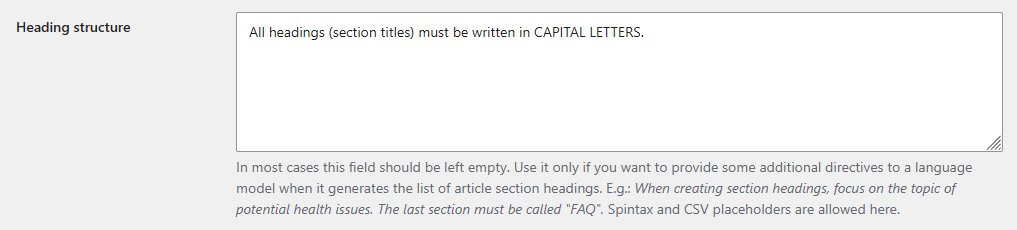
3. This is entirely a matter of prompting, not a limitation of the plugin itself. Different AI models generate different amounts of text. Even the GPT-4o mini can be verbose if left unrestricted. To tame the output and make it shorter, you must explicitly request the desired length in your prompt. Add a strict instruction to your system prompt or section template, such as: "Keep each section short with a maximum of two paragraphs and get straight to the point". The AI will follow your instructions, write less, and finish its sentences within your token limit.
Most Users Ever Online: 1026
Currently Online:
12 Guest(s)
Currently Browsing this Page:
1 Guest(s)
Top Posters:
ninja321: 87
harboot: 75
s.baryshev.aoasp: 68
Freedom: 61
Pandermos: 54
tormodg: 53
Member Stats:
Guest Posters: 338
Members: 3319
Moderators: 0
Admins: 1
Forum Stats:
Groups: 1
Forums: 5
Topics: 1760
Posts: 9080
Newest Members:
lapageparfaite27, vardis11, miranewsru, sezginmercan00, sciencexxi.com, rusamara.comAdministrators: CyberSEO: 4276